AudioBud
Press a key, speak, and your words land in whatever text field has focus.
A local-first dictation app for Windows. Transcription runs on your own machine -- no audio ever leaves it. A detached fork of Handy with its own defaults and a frog at the wheel.
Unsigned build -- Windows SmartScreen warns on first launch; choose More info, then Run anyway.
How it works
Three steps, all on your machine.
Press the hotkey
Hold Ctrl+Alt+Space (the Windows default) to start and stop recording. The chord is yours to change.
Speak
Silero voice-activity detection trims the silence so the engine only hears your words.
It types for you
AudioBud transcribes locally and drops the text straight into the focused field.
What it does
Dictation runs entirely on your machine. The one exception is optional LLM cleanup, which sends text to a provider only when you turn it on. The list reflects what is in the app today.
Local transcription
Audio never leaves your machine. There is no cloud step and no account.
A choice of engines
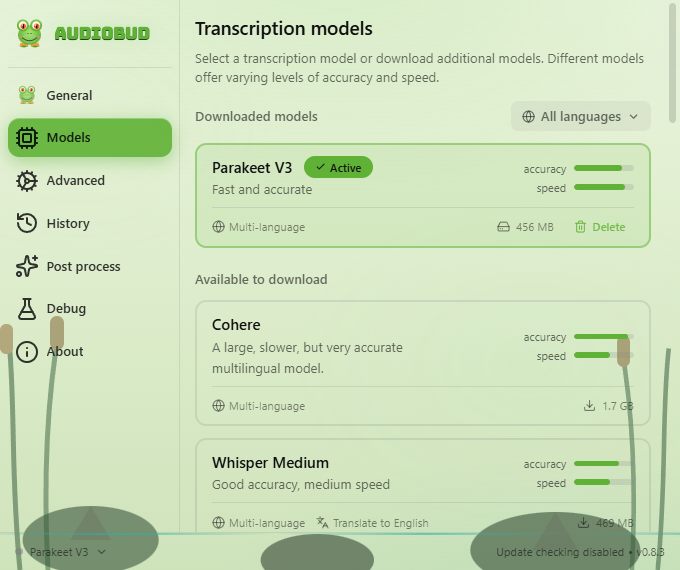
Parakeet (ONNX/DirectML) and Whisper (whisper.cpp/Vulkan), plus Moonshine, SenseVoice, GigaAM, Canary, and Cohere. Each downloads from inside the app.
Many languages
Parakeet V3 handles 25 European languages; Whisper adds many more and can translate to English. The interface ships in more than a dozen languages.
Push-to-talk or toggle
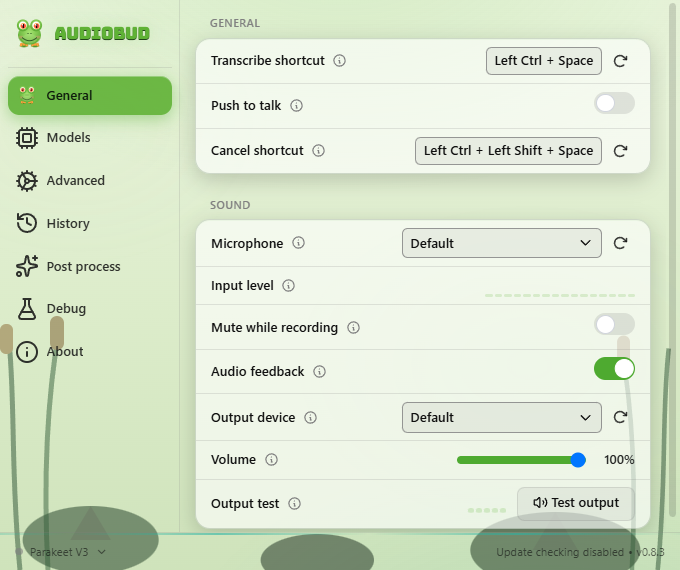
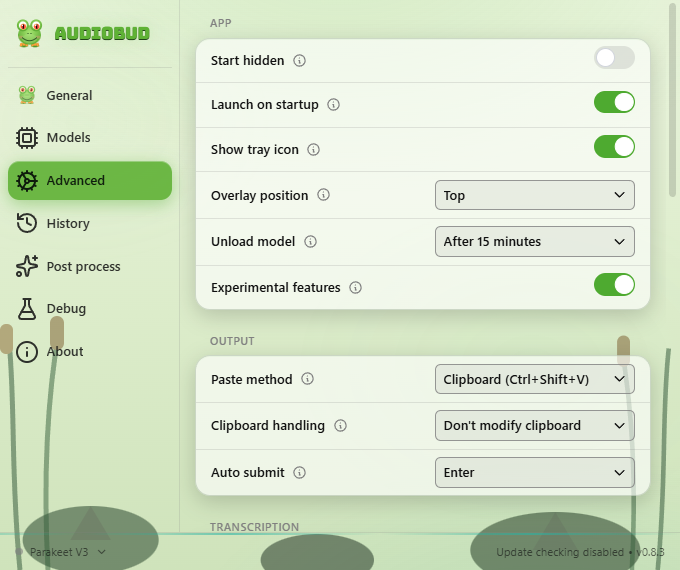
A configurable global hotkey, a hold-to-talk or tap-to-toggle mode, and an optional auto-submit key.
Optional LLM cleanup
Send a transcript through a provider of your choice with your own prompt. Off by default; your API key stays local.
Custom words
Teach it the names and jargon it would otherwise miss, with a simple .txt import.
History and retention
Keep recent transcriptions and recordings, or set them to expire on your schedule.
GPU control
Pick the Whisper and ONNX accelerators -- auto, CPU, CUDA, DirectML, or ROCm -- and the GPU device.
Tray, autostart, CLI
Live in the system tray, start on boot, and drive a running instance from the command line.
A look inside
Real panels from the running app. Shortcuts shown are customized; the Windows default is Ctrl+Alt+Space.
Where it stands
AudioBud is an early prototype. Here is the honest state of things.
- Milestone A. A working local prototype, packaged as a Windows build (v0.1.0). It is not code-signed yet, so SmartScreen warns on first launch. You can also build from source.
- Windows first. Validated on Windows 11. The macOS and Linux code is inherited from Handy and has not been tested here.
- Update checks are off. The inherited updater still points at Handy's release feed; checks return once that feed is repointed to AudioBud and its builds are signed.
- A fork, openly. AudioBud keeps Handy's local engine and Tauri architecture, with its own defaults and identity.